

User Experience on ePro
ePro is designed around the real people placing orders day to day. The interface is clear, familiar, and easy to navigate, so users can find what they need and place orders quickly without training or support. By removing friction at every step, ePro reduces mistakes, speeds up ordering, and increases adoption across your customer base.
When a platform is easy to use, it gets used properly. That’s why user experience sits at the heart of ePro..







Designed for Real Users
Simple and Familiar To Use
Clean, uncluttered interface
Products shown only when they’re relevant to the user
Familiar basket and checkout flow
Clear product information and imagery
Easy navigation with minimal clicks
Helps to Save Time and Avoid Mistakes

Repeat ordering with saved baskets
Saved sizes and user profiles
Tailored pricing and product groups
Works seamlessly on desktop, tablet, and mobile
Clear visibility of past and current orders
.
Ordering Made easy
It’s ease of use and setup in the background makes it so easy for a new customer to jump on and order what they need. With what they can see being tailored specifically to them with specific pricing. It will save them and you time as well as avoiding order mistakes that might happen over the phone.
Watch this video to see just how easy it would be for your customers to log in and place an order for what they need.
Customization & Brand Control

-
Each user gets their own login, with granular permissions down to the employee level, ensuring secure and efficient ordering.
-
Manage orders and approvals across multiple branches with ease, assigning specific permissions for each user.
-
Organise and report on orders by branch, gaining valuable insights into spending and usage. Our intuitive system guides you:
1. Select Branch,
2.Choose eKit & browse agreed product lists,
3. Add custom requirements,
4. Repeat for other branches. -
Access a vast catalogue of products with negotiable discounts or create custom lists of "your products" at pre-agreed pricing.
-
Add your company logo to products and even personalise garments with employee names, boosting brand visibility. Manage different logos for different branches and products. Have your own customised login/homepage. Customers can have their own logo showing on their account.
-
Enforce purchase order numbers and verify them against your system for seamless integration and accurate tracking.
-
Offer different product lines to different depots, each with its own tailored tab and logo options.
-
Designed specifically for PPE, our platform makes selecting the perfect fit and colour simple.
Enhanced User Experience & Support:
-
Order from any device, anywhere, anytime.
-
Tailor the platform's colour scheme to match your company brand.
-
Easily access your account manager's details directly through your portal
-
Our dedicated support team is always available to assist you.
-
Access datasheets and other product information directly from the platform.
-
Choose from various delivery options, including click & collect from the trade counter.
-
Pay by card or account, whichever suits you best.
-
Utilise flexible promotional codes for discounts and special offers.

Efficient Ordering & Management:
-
Connect with existing business systems to send orders, stock and despatching info across.
-
Quickly find useful information through powerful search function across both custom and full catalogues.
-
See stock gauges as you order, empowering informed purchasing decisions.
-
Track your orders by branch, status, eKit name, or date. Downloadable reports provide comprehensive spend analysis and management insights.
-
Integration with third-party workwear fitting. Allowing automated size recommendations, ensuring a perfect fit for every employee. Plus, we retain size data for each person, simplifying future orders and ensuring consistent sizing and minimising returns.
Sizing functionality is provided by Mirrorsize
-
Experience a range of 3rd party integrations making ePro more seamless with your business needs and requirements, featuring add-ons from the following sectors.
Catalogue Punchouts via cXML Industry Standards, linking you with known providers like Coupa, SAP, Oracle and more.
Payment Merchants that can handle payments for you via providers such as Stripe and Elavon.
Address Validations via well known providers, such as Google and Loqate.
Extensive template design and modifications via APITemplate.
-
Receive email notifications for order acknowledges, order approvals , despatches and more.
-
Set minimum/maximum order approval limits for enhanced budget control.
-
Submit return requests and replacements online for a hassle-free process.
-
Set up recurring orders for regular supplies, saving you time and effort.
-
Expedite delivery by splitting orders into logoed and non-logoed items.
-
Save draft orders for later completion.
Personalisation
-

Every user has a personal login, even down to employee level if required.
-

Extensive & customisable email notifications including order, despatch and return notifications.
-

Whether you are on a table/mobile/desktop you can order from the website whatever device you are have to hand.
-

Restrict Site Access for Individual Users/Managers if required showing relevant sites only. Permissions style user management.

A collage of four images: a worker welding with a protective helmet, a female barista pouring cream into a cup in a coffee shop, a construction worker with a safety vest and helmet working on a building site, and a scientist in a lab coat and mask working with a pipette.
Reporting
-

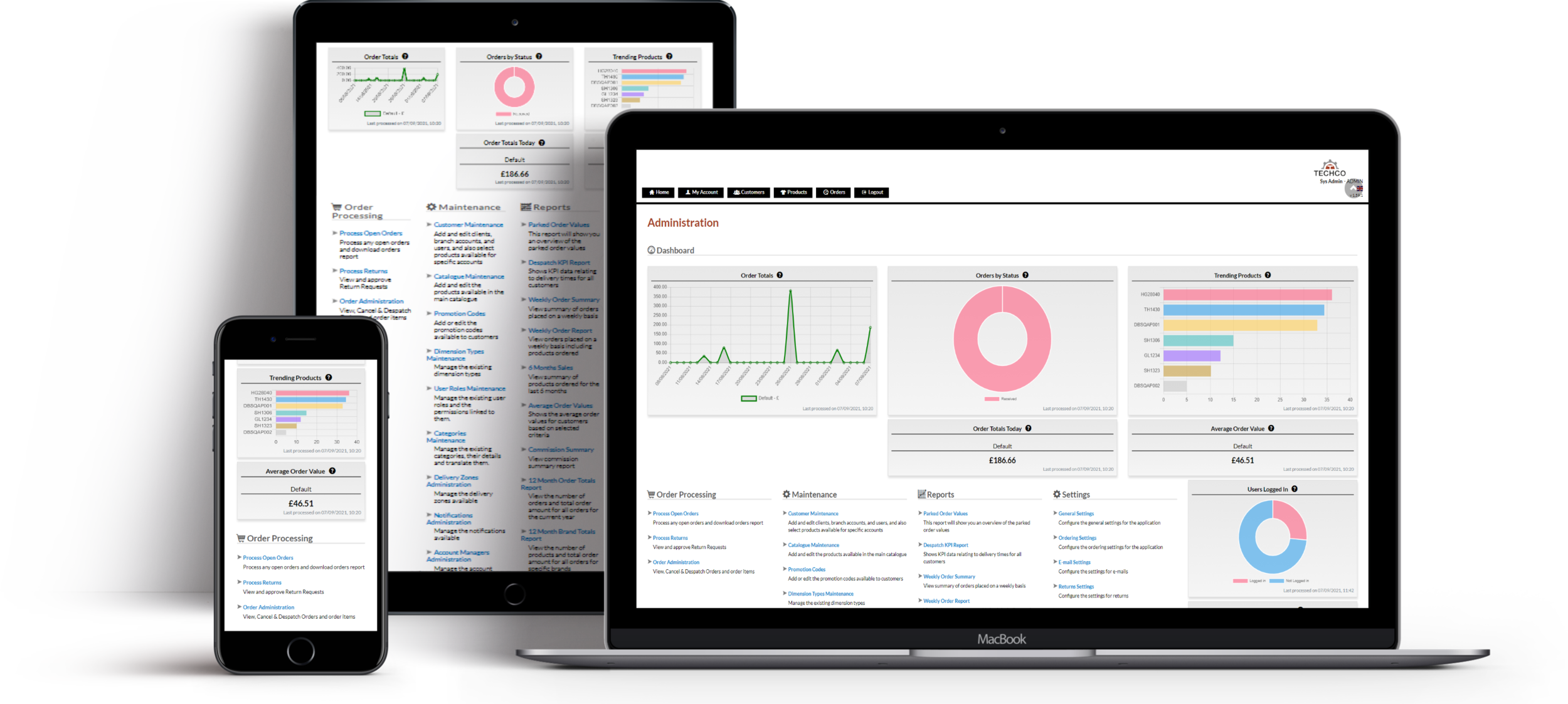
Enjoy access to detailed, web-based KPI and usage reports, offering valuable insights into your operations. Reports can be exported into Excel or .csv formats for advanced analysis and record-keeping.
-

An intuitive and powerful dashboard tailored for ordering and admin users of ePro. It provides comprehensive visibility, actionable insights, and seamless control over all sales and administrative activities.
-

Track and evaluate supplier performance with in-depth KPI reports. These reports help ensure your suppliers are meeting expectations and support data-driven decision-making for improved outcomes.
Ready to take your B2B business online with ePro?
Contact us today to learn how this powerful platform can help transform your operations and elevate your customer experience.
-
HQ UK Office
128 City Road,
London,
England,
EC1V 2NX
Global Offices
-
Europe
25 Rue Tronchet,
75008
Paris -
USA
3921 Perry Blvd,
Whitestown,
Indianapolis
46075 -
Australia
56 Gardiner Street,
Rutherford, Sydney NSW,
2320